Stop Letting Your Lightbulbs Share WiFi With Your Laptop
Photo: DeclanMiner2023, CC BY-SA 4.0, via Wikimedia Commons
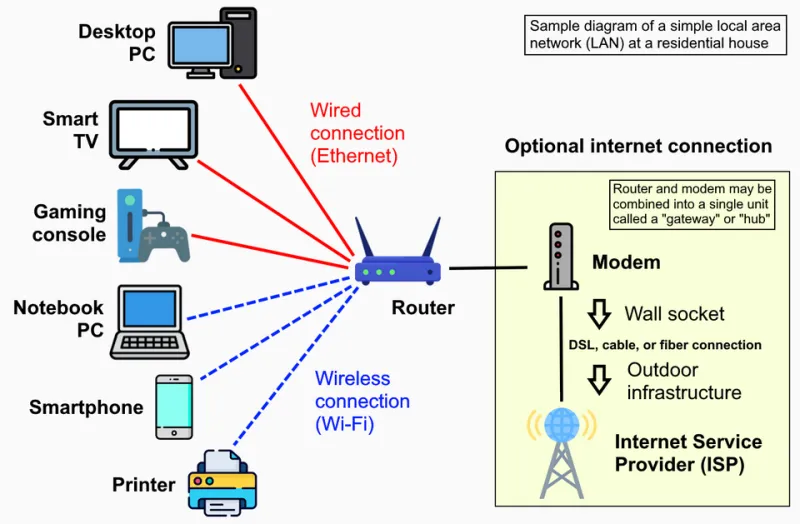
There is a specific kind of frustration that only shows up in a connected home. Your video call freezes the instant the robot vacuum starts its run. The porch camera drops offline at the exact moment a package arrives. Your smart bulbs respond to a command somewhere between two and nine seconds later, if at all.
Most people respond by buying a bigger router. That helps, sort of, but it treats a symptom. The actual problem is that you are running two very different kinds of traffic through one lane, and one of them is a lot needier than you think.
Your Gadgets Are Not Polite Houseguests
Phones and laptops are designed to be reasonable. They buffer, they back off, they drop to lower power when idle. Cheap smart home hardware does not do any of that.
A $12 WiFi plug has a radio roughly as sophisticated as a microwave timer. It connects, it shouts its status, it reconnects when it loses signal, and it repeats this cycle forever. Multiply that by thirty or forty devices and you have a constant low-grade hum of management traffic on your network — tiny packets, enormous overhead.
Then there is the 2.4 GHz band, which is where the overwhelming majority of smart home gear lives. It is also where your microwave, your baby monitor, your neighbor's router, and every Bluetooth device in a fifty-foot radius are fighting for space. That band has three usable channels in the US. Three.
What a Separate Network Actually Buys You
Putting your gadgets on their own network does two things at once, and both matter.
Stability. Your laptop and your streaming stick get the fast, uncrowded lanes. Your bulbs get a network tuned for many slow devices rather than a few fast ones. When the vacuum kicks on, your work call does not notice.
Security. This is the bigger one, honestly. A cheap smart plug from a brand you have never heard of is a small computer with an old firmware image and no patch history. If it gets compromised — and this happens more than the industry likes to admit — a separated network means the attacker lands in a room full of light switches instead of next to your tax returns and your kid's school portal.
Three Ways to Do It, Ranked by Effort
You do not need to become a network administrator. Pick the rung that matches your patience.
The guest network workaround
Nearly every router sold in the US in the last decade has a guest network toggle. Turn it on, give it its own name and password, and move your smart devices onto it. Fifteen minutes of work.
The catch: many routers isolate guest clients from each other, which breaks anything that needs devices to talk to one another — casting, some hubs, a few speaker groups. Some routers let you disable that isolation. Check yours before committing.
A dedicated SSID on the main network
Give your gadgets their own network name with its own password, but keep client isolation off. You get most of the organizational benefit and none of the discovery headaches.
This is the sweet spot for the vast majority of households, and it is what I would recommend to anyone who does not want to think about this ever again.
A real VLAN
Segmentation at the router level, with firewall rules between segments. This is the properly correct answer and the one that will cost you an afternoon of reading and at least one round of troubleshooting why the printer vanished. Worth it if you enjoy this sort of thing. Not required.
The Tradeoffs Nobody Warns You About
Segmentation breaks things. That is the honest headline.
AirPlay and Chromecast depend on devices finding each other on the same subnet. A speaker group that spans rooms may stop working. Some hubs — particularly older ones — will simply refuse to see devices on another network. HomeKit in particular can be fussy about cross-network discovery.
Plan for an evening of re-pairing. Move the devices over a weekend, not the night before a work presentation, and expect to re-add a handful of stubborn gadgets by hand.
Which Households Actually Benefit
If you have more than about fifteen connected devices, a separate network is worth the effort. Full stop. The stability gain alone justifies it.
If you have a handful of bulbs and a smart speaker, you will survive without it. The security argument still applies, but the returns diminish fast.
If you work from home on video calls all day while a house full of gadgets churns in the background, this is probably the single best thing you can do for your sanity this month — better than a new router, better than a faster internet plan.
Start with the guest network if you want to test the waters. Graduate to a dedicated SSID once you confirm nothing important breaks. Your laptop will thank you, and your bulbs will not even notice they have been moved.